



5 Simple Steps to Create Bhumi Locker in Bihar — Secure Your Property Documents Online (Complete Guide 2024)
Bihar Bhumi Seva पर अपना Bhumi Locker बनाकर अपनी जमीन के दस्तावेज़ सुरक्षित रखें। यह गाइड KYC, दस्तावेज़ अपलोड और प्रमाणन के 5 आसान स्टेप्स बताता है।

Suggested: replace with a real screenshot of your Bhumi Locker dashboard for higher trust.
Quick overview / संक्षेप Bihar Bhumi seva
Bhumi Locker Bihar is a free, secure feature on Bihar Bhumi Seva to store verified property documents online. Use this to keep sale deeds, mutation certificates, and other records safe and easily accessible.
यहां हम बार-बार उपयोग होने वाले focus keywords natural रूप से इस्तेमाल करेंगे: Bhumi Locker, Bihar Bhumi Seva, land registration Bihar, property documents, KYC Bihar.
Step 1 — Sign up & Complete KYC / साइनअप और KYC पूरा करें
Bihar Bhumi seva
Short and clear steps help increase conversions and search relevance. Use mobile number, OTP verification and select user type carefully.
- Go to: Bihar Bhumi Seva and click Signup.
- Select user type: Land Owner, Land Broker, Amin, Munsi, Bhumi Locker.
- Enter mobile → verify OTP → fill personal details (name, email, address).
Tip: Use the same name on KYC that appears on your property documents to avoid rejection.
Step 2 — Dashboard & Profile / डैशबोर्ड और प्रोफ़ाइल
Bihar Bhumi seva
Open your dashboard and click My Profile → update KYC. Short paragraphs improve readability and SEO.
- Update personal details: first name, last name, email, mobile, address, WhatsApp.
- Upload passport-size profile photo and click Update KYC.
Step 3 — Bhumi Locker: Upload Documents / भूमि लॉकर में दस्तावेज़
Bihar Bhumi seva
जोड़ें
Bhumi Locker stores PDF copies of your property papers (max recommended 2MB per PDF). Combine related documents into one PDF when possible.
- PAN verification & Aadhaar verification (enter number and verify OTP).
- Prepare scanned documents: Sale Deed, Mutation Certificate, Khata/Khasra copies.
- Upload files: one PDF per property (size & format guidelines explained on portal).
Step 4 — Fill Property Details Carefully / सम्पत्ति विवरण भरें
Bihar Bhumi seva
Short inputs reduce user errors and speed up verification. Make sure the KYC name and property owner name match exactly.
- Select District → Circle → Mauza.
- Enter Khata number, Khesra number, area (decimal/decimal format), Jamabandi number.
- Attach scanned PDF (Sale Deed, Mutation, ID proof) and click Submit.
Step 5 — Verification & Go Live / सत्यापन और लाइव
Portal verification can take a few days depending on document accuracy. After approval, your Bhumi Locker entry is live and searchable through the Bihar Bhumi Seva system.
Once verified, you can safely post property ads and receive buyer enquiries with higher trust.
Helpful Video — How to Create Bhumi Locker (Demo)

Embed a short 2–4 minute demo showing “Signup → KYC → Upload” for best engagement.
Official Resources & External Links Bhumi Locker in Bihar
Always verify any legal step with official government resources:
Short FAQs — अक्सर पूछे जाने वाले सवाल Bhumi Locker in Bihar
Q: Bhumi Locker क्या है?
A: Bhumi Locker एक डिजिटल फ़ीचर है जहाँ आप अपनी संपत्ति के प्रमाणपत्र सुरक्षित PDF में रखें।
Q: क्या KYC अनिवार्य है?
A: हाँ — KYC बिना Bhumi Locker सत्यापित नहीं होगा।
Q: क्या Bhumi Locker मुफ्त है?
A: हाँ — पोर्टल पर भंिु लॉकर बनाना और बेसिक लिस्टिंग आम तौर पर निशुल्क है।
Q: कितनी जल्दी वेरिफिकेशन होती है?
A: दस्तावेज़ों की शुद्धता पर निर्भर; आमतौर पर कुछ दिनों में।
Quick Checklist — अपलोड से पहले Bhumi Locker in Bihar
- Mutation Certificate (if available)
- Sale Deed / Conveyance document
- ID Proof: Aadhaar, PAN
- Address Proof
- Combined PDF ≤ 2MB per property recommended
Disclaimer: This page provides guidance for using Bhumi Locker and Bihar Bhumi Seva. For legal or complex title issues consult a qualified lawyer or your local sub-registrar office.
बिहार भूमि सेवा में आपका स्वागत है, भूमि लॉकर बनाना हैं। अपने सम्पति डॉक्यूमेंट दस्तबेज को ऐड करे और लाइफ टाइम टेंशन फ्री रहे जो के पूरा निःशुलक है जाने प्रोसेस क्या है भूमि लॉकर बनाने का फॉलो करें निर्देश अनुसार । बिहार भूमि सेवा में बिना रजिस्ट्री के कोई भी प्लॉट खरीदने के लिए आप स्वयं जिम्मेदार होंगे।
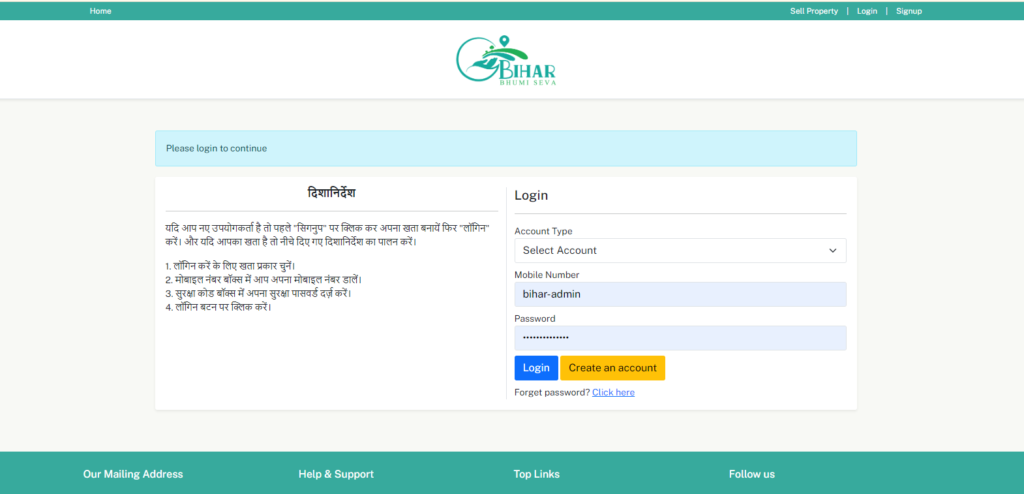
- Click on signup & भूमि लॉकर
- Select User Type – उपयोगकर्ता प्रकार चुनें- Land Owner, Land Broker, Amin, Munsi, Bhumi locker.
- Enter Mobile Number – मोबाइल नंबर दर्ज करें
- Enter OTP – ओटीपी दर्ज करें
- Post Your Property Advertisement For Free Click Here…
2. Dashboard – डैशबोर्ड


- Click My Profile – Personal Information
- First name, Last name , Email Id, Mobile, Address, City, Pincode, WhatsApp Number, Profile Photo, अन्यबर है Click – UPDATE KYC
- Post Your Property Advertisement For Free Click Here…
3. Bhumi Locker – Complet KYC

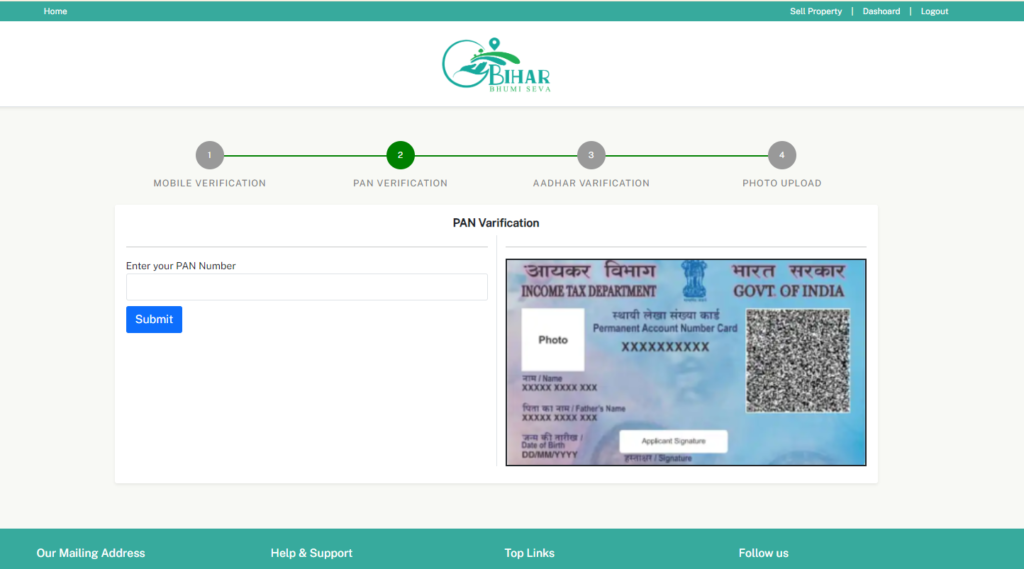
- PAN VERIFICATION, AADHAR VARIFICATION, PHOTO UPLOAD.
- PAN Verification – Enter Your Pan number, + Aadhar Verification – Enter Aadhar Number, +
- Create Password + upload Profile
- Post Your Property Advertisement For Free Click Here…
Post Your Property Advertisement For Free Click Here…
4. After KYC click Bhumi Locker
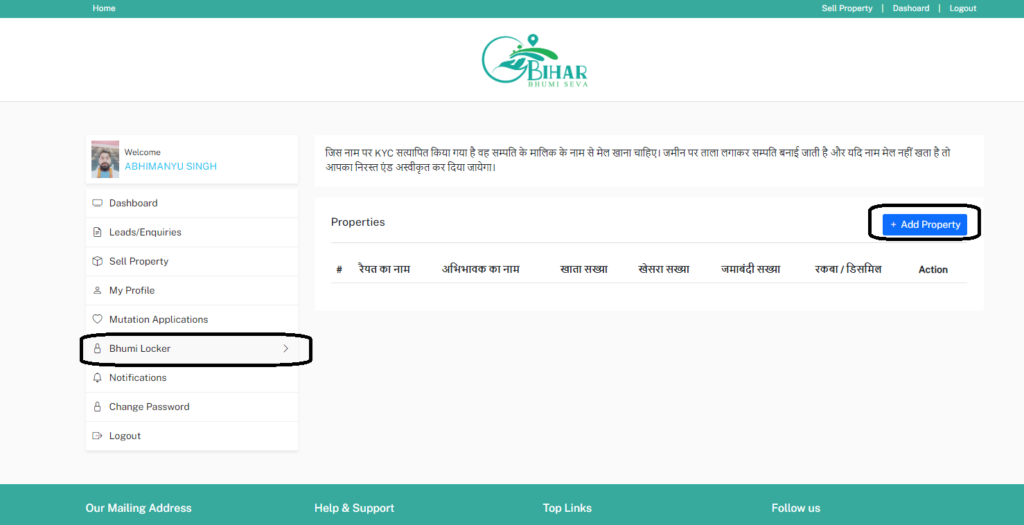
Click Add property. जिस नाम पर KYC सत्यापित किया गया है वह सम्पति के मालिक के नाम से मेल खाना चाहिए। जमीन पर ताला लगाकर सम्पति बनाई जाती है और यदि नाम मेल नहीं खता है तो आपका निरस्त एंड अस्वीकृत कर दिया जायेगा।

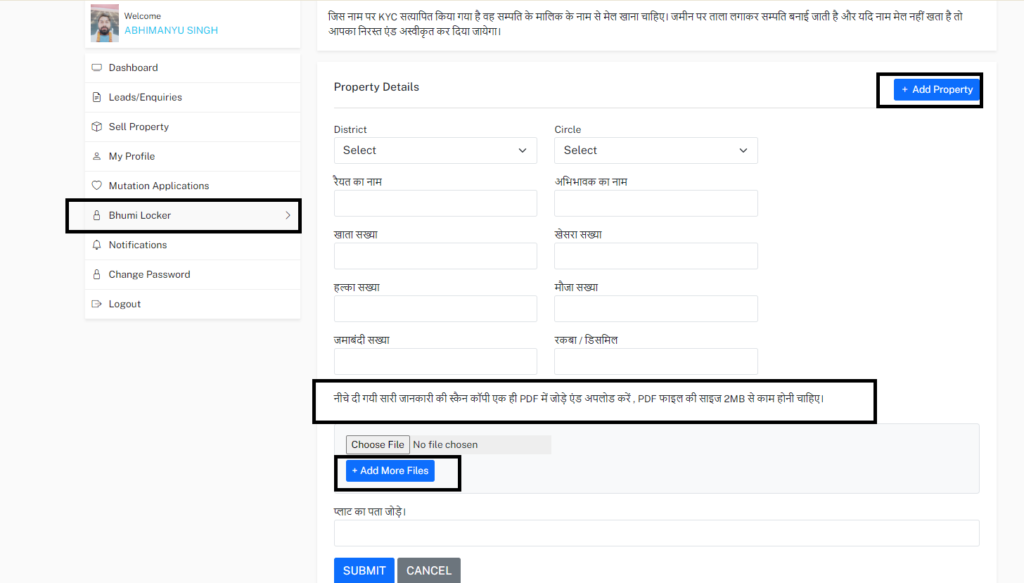
- District Select
- Circle Select
- रैयत का नाम
- अभिभावक का नाम
- खाता सख्या
- खेसरा सख्या
- हल्का सख्या
- मौजा सख्या
- जमाबंदी सख्या
- रकबा / डिसमिल
- नीचे दी गयी सारी जानकारी की स्कैन कॉपी एक ही PDF में जोड़े एंड अपलोड करें , PDF फाइल की साइज 2MB से काम होनी चाहिए।+ Add More Files प्लाट का पता जोड़े। SUBMIT
बिहार भूमि सेवा में बिना रजिस्ट्री के कोई भी प्लॉट खरीदने के लिए आप स्वयं जिम्मेदार होंगे।
Post Your Property Advertisement For Free Click Here…
- यह काम किस प्रकार करता है
जिस नाम से अपने KYC किया है भूमि लॉकर बनाने के लिए उस नाम से प्रॉपर्टी का दस्तावेज होना चाहिए किसी और के नाम से दस्तावेज अपलोड होना नहीं होना चाहिए तो आपका भूमि लाकर कैंसिल कर दिया जाएगा और रद्द कर दिया जाएगा किसी और व्यक्ति का दस्तावेज अगर आप डालते हैं तो कैंसिल हो जाएगा