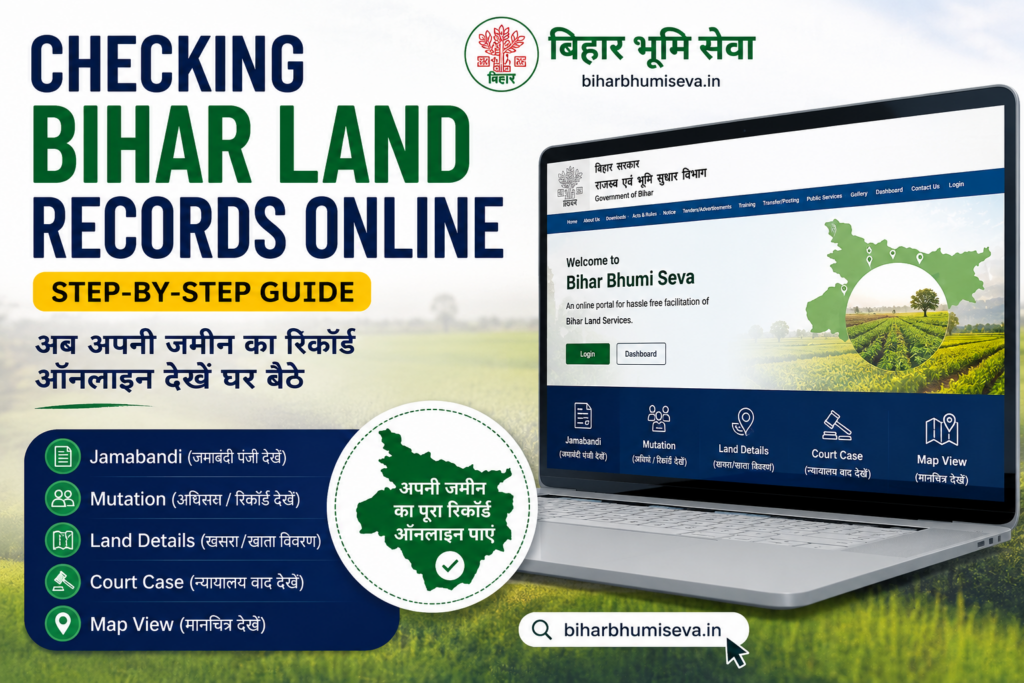
Checking Bihar Land Records Online (Step-by-step)
One of the most important things you need to be aware of in case you own land in Bihar, or you are planning to buy property, is checking Bihar land records online. You want to verify ownership, you want to download your Khatiyan, you want to check the status of mutation, or you just want to ensure that a property is dispute-free; all this can now be done online by using a phone or computer.
Gone are the days when you had to go to the office of the Block, wait in long queues, or pay someone just to get basic information about the land. Online land records in Bihar: The Bihar government has made online land records in Bihar available to all citizens through official portals such as Bhumijankari and Bihar Bhumi. Such sites as Bihar Bhumi Seva simplify this process even more by taking you through each and every step.
Here you will find out how to check Bihar land records online, step-by-step, in simple language that can be followed by anyone.
What are Bihar Land Records?
The Bihar land records are government records that have detailed information regarding land and property in Bihar. These records include the names of the owners of the land, the size of the land, the type of land, and whether there are any legal disputes or dues on the land.
Bihar has its own record of every piece of land, which is maintained by the state government. The Revenue and Land Reforms Department of Bihar maintains these records, which can be accessed via portals such as Bhumijankari and Bihar Bhumi.
Bihar has various kinds of land records. All of them have their purposes.
To get a feel for them, here is a simple table:
Types of Bihar Land Records
| Land Record | Local Name | What It Contains |
| Khatiyan | खतियान | Owner’s name, plot number, land area, land type |
| Jamabandi | जमाबंदी | Record of rights — ownership and possession details |
| Mutation Record | दाखिल खारिज | Transfer of land ownership from one person to another |
| Bhumi Naksha | भू नक्शा | Map of the land showing exact boundaries and shape |
| Kabala / Deed | काबाला / केवाला | Legal sale document proving land purchase |
| Land Tax Receipt | लगान रसीद | Proof of land tax payment to the government |
Why Check Bihar Land Records Online?
When you check the land records in Bihar online, you save yourself time, money, and the stress that you may have. In the past, any land-related document required one to visit the government offices several times, deal with intermediaries, and wait days or even weeks before a document was received. Now, with online Bihar land records, everything is at your fingertips – 24 hours a day, 7 days a week.
The following are the main reasons why all landowners and those who are buying land in Bihar should go and check land records online:
Advantages of Bihar Land Records Checking Online
- Check ownership of Land– Always ensure that you are the legal owner of a given property before making a purchase. This helps you to avoid fraud and counterfeit sellers.
- Check for Legal Disputes — Find out if any court case, loan, or dispute is attached to the land before making any transaction.
- No Office Visit Required – You can check your Bihar Bhumi records from the comfort of your house using your mobile or computer without having to visit any office of the Block or Tehsil.
- No Cost — It is a totally free service to all citizens to check land records on official portals such as Bhumijankari and Bihar Bhumi.
- Download Documents Instantly – You can download your Khatiyan, Jamabandi, or check your Dakhil Kharij mutation status on the fly.
- Eliminate Middlemen and Bribes — Online access eliminates the need to pay brokers or agents just to get basic land information.
- Bank Loans Useful – Banks and other financial institutions will require certified land records to be used in securing property loans. Their presence on the internet makes this process quicker.
- Legal Proof of Ownership – Download land records as supporting documents in legal cases, property disputes, and legal proceedings.
- Check Mutation Status Anytime — After applying Dakhil Kharij, you can check your mutation status in Bihar online in real time without calling anybody.
- Safe and Transparent Government portals ensure that the information is correct, official, and not tampered with.
This is even easier with platforms such as Bihar Bhumi Seva, which combine all these services in one place – whether you need to check your Khatiyan, download a Kabala, or even track your online mutation status in Bihar. These tools do not require that one be tech-savvy in order to use them. Provided you have access to a smartphone, you can access your land records online in Bihar within a few minutes.
Online Sites to Check Bihar Land Records Online
The Bihar government has also opened various government websites, where you can check and download land records online at no cost. The purpose of each of the websites is slightly different. Being aware of which site to employ to accomplish this or that task will save you a great deal of time.
This is the entire list of all the significant sites to check online land records in Bihar:
Official Portals for Bihar Land Records
| Website | URL | What You Can Do |
| Bhumijankari | bhumijankari.bihar.gov.in | Check Khatiyan, Jamabandi, plot details, and land type |
| Bihar Bhumi | lrc.bih.nic.in | Check mutation status, Dakhil Kharij, and land records |
| DCLR Bihar | dclrbihar.gov.in | Court cases, revenue appeals, and land dispute status |
| Bhumi Naksha Bihar | bhunaksha.bihar.gov.in | View and download the land map and plot boundaries |
| IGRS Bihar | igrs.bihar.gov.in | Download registered deed, Kabala, sale documents |
| Bihar Bhumi Seva | biharbhumiseva.com | All-in-one — Khatiyan, Kabala, Mutation, Amin, Broker services |
Which website should you use?
When deciding on an appropriate portal, it all depends on what you are seeking. The following is a little guideline:
- To verify the owner of a plot, → Use Bhumijankari.
- To get down your Khatiyan or Jamabandi → Use Bhumijankari.
- To check Dakhil Kharij or Mutation Status, Bihar → Use Bihar Bhumi (lrc.bih.nic.in)
- To see your land map or boundaries → Use Bhumi Naksha Bihar
- To download Kabala or a registered deed • Use IGRS Bihar.
- To check revenue court cases → Use DCLR Bihar
- To accomplish all the above in the same location with easy instructions → Use Bihar Bhumi Seva.
Why Bihar Bhumi Seva Is Different
.
The majority of government portals are not user-friendly, particularly to individuals who are not tech-savvy. This issue is addressed by Bihar Bhumi Seva, in which all Bihar land record services are accommodated under one roof. Be it checking your Khatiyan, online mutation in Bihar, downloading a Kabala, or finding a verified Amin to survey your land- Bihar Bhumi Seva makes the whole process not only very easy, but also very fast and hassle-free.
You do not have to open a number of websites and decipher the complex government websites. Bihar Bhumi Seva helps you in a step-by-step manner, so that you do not have to face any confusion when it comes to getting the right document.
Checking Of Bihar Land Records Online – Step-by-Step
This is the most important section of this guide. Simple and easy-to-follow directions on how to check various types of Bihar land records online are provided below. These steps can be followed on your computer or cell phone without any form of technical expertise.
a. Checking Khatiyan by Name or Plot No. in Bihar
The most popular land record search in Bihar is Khatiyan. It displays the name of the owner, plot number, land area, and land type. The following is the method of checking it online:
Step 1: Open your browser and go to bhumijankari.bihar.gov.in
Step 2: On the home page, one needs to click on either of the following links: Bihar Bhumi – View Your Account or Apna Khata Dekhen.
Step 3: A map of Bihar will be visible. Click on your District on the map.
Step 4: Once you have chosen the district, you can now choose your Block (Anchal).
Step 5: You now have a list of options that are displayed. Choose your Halka and your Mauja (Village).
Step 6: At this point, select how you would like to search:
- By Khatiyan Number
- By Plot Number (Khesra)
- By Owner’s Name
Step 7: Add the necessary information and press the search button or Khoje.
Step 8: On the screen, the details about your Khatiyan will be presented. You can either read it online or save or download it by clicking on the button called Print.
b. Checking Mutation / Dakhil Kharij in Bihar Online
The concept of updating land ownership in government books following a sale, inheritance, or gift is called mutation (Dakhil Kharij). Bihar is easily monitored online, as the mutation status after the application.
Step 1: Visit lrc.bih.nic.in – the official Bihar Bhumi portal.
Step 2: On the homepage, you will see the top menu with the text Dakhil Kharij. Click on it.
Step 3: Select “Online Mutation Status” from the dropdown menu
Step 4: This will open a new page. In the dropdown lists, select your District and Block.
Step 5: You need to enter your Case Number or Application Number, which you got when you applied for mutation.
Step 6: Select the button of either search or khoje.
Step 7: The status of your Dakhil Kharij will be displayed with whether your application is:
- Approved
- Pending
- Rejected (with reason)
Step 8: Approved: You can now directly download your mutation certificate on this page.
c. Deed / Kewala Online Downloading in Bihar
A Deed or Kewala is the title document that certifies that land has been purchased legally. On the IGRS Bihar portal, you can download your old/new deed on the internet.
Step 1: Visit igrs.bihar.gov.in – the official portal for the registration of properties in Bihar.
Step 2: On the home page, there is a button called View Registered Document or in Hindi, पंजीकृत दस्तावेज दekhE.
Step 3: Choose your District and Registration Office from the dropdown.
Step 4: Fill in the information about your deed:
- Deed Number (दस्तावेज संख्y)
- Registered year (panjikkaran vars)
- Or by Party Name (पक्षakार का नाम)
Step 5: Type in the Captcha code displayed on the screen and then click on the search.
Step 6: What will show will be your registered deed or Kewala. To open the document, click on “View Document” to open the document.
Step 7: You may now download or print your Kewala / deed directly from the portal.
Related Articles:
Bihar Land Record: Download Your Khatian Online (खतियान डाउनलोड करें)
Circle Officer in Bihar Roles and Responsibilities Explained
What are Khata Number, Khasra Number, and Plot Number? Full Details
Bihar Bhumi Naksha Download – Step-by-Step Guide
5 Easy & Reliable Ways to Find the Real Land Owner in Bihar
How to Apply for Land Registry in Bihar – Process Explained
Common Land Mutation Mistakes in Bihar & How to Avoid Them
H2: Checking of Bihar Land Records through Bihar Bhumi Seva
Although government portals such as Bhumijankari and Bihar Bhumi are free and official, many of them are hard to use. The websites are not always fast, disoriented, or not mobile-friendly. Here, Bihar Bhumi Seva is of great assistance.
Bihar Bhumi Seva (biharbhumiseva.com) is a dedicated website that was created specially to make Bihar land record services easy, quick, and accessible to every citizen, whether you are tech-savvy or not.
What Will You Do on Bihar Bhumi Seva?
Here you can find everything you can find on Bihar Bhumi Seva in a single place:
- Download Khatiyan – Find and download your Khatiyan by name, plot number, or by Khatiyan number.
- Check Online Mutation Status Bihar — Check the online status of your Dakhil Kharij application in Bihar.
- Download Kewala / Deed — Get your registered sale deed or Kabala without having to visit the IGRS office.
- Look Bhumi Naksha – See your land map and plot boundaries online.
- Find Verified Amin – Find a government-verified Amin to survey land in your area.
- Find Property Brokers — Find trusted and verified property brokers in your district.
- Post Land for Sale — Post your land or property for sale right on the site.
- Mobile App Available – The Bihar Bhumi Seva app allows the use of all services on your Android phone.
Use of Bihar Bhumi Seva – Step-by-step
Step 1: Open your browser or mobile and go to biharbhumiseva.com
Step 2: On the home page, you will find all the services well listed – choose the service you require.
Step 3: It is a Khatiyan or land record check. In Khatiyan, all the districts, blocks, and villages have a Khatiyan section, which is a part of the revenue section.
Step 4: To be aware of your online mutation in Bihar status: Click on the Dakhil Kharij section and enter the application number or plot details to track your online mutation in Bihar status.
Step 5: To download a deed or a party name in Kabala or Deed Download – Click on the deed download section or the party name download section and enter a deed number or party name, and download your document immediately.
Step 6: In case you require assistance in any of the steps, Bihar Bhumi Seva supports you through WhatsApp, so that you can receive assistance without any misunderstanding.
Frequently Asked Questions (FAQs) – Bihar Land Records Online
Q1. How can I check Bihar land records online for free?
You can check Bihar land records online for free by visiting the official government portal bhumijankari.bihar.gov.in. On this website, you can search your Khatiyan, Jamabandi, and plot details by entering your district, block, village, and owner name or plot number. No registration or payment is required. You can also use Bihar Bhumi Seva (biharbhumiseva.com) for a simpler and faster experience.
Q2. What is the difference between Khatiyan and Jamabandi in Bihar?
Khatiyan is the land record that shows the owner’s name, plot number, land area, and land type. It is the primary document that proves ownership of land in Bihar. Jamabandi is the record of rights that includes both ownership and possession details. In simple words, Khatiyan tells you who owns the land, while Jamabandi tells you who owns and who uses the land. Both documents are available for free on Bhumijankari Bihar.
Q3. How do I check my Dakhil Kharij or mutation status in Bihar online?
To check your mutation status in Bihar online, follow these steps:
- Go to lrc.bih.nic.in (Bihar Bhumi portal)
- Click on “Dakhil Kharij” in the top menu
- Select “Online Mutation Status”
- Choose your District and Block
- Enter your Case Number or Application Number
- Click “Search” to see your current mutation status
If you do not have your case number, you can also search by applicant name or plot number on the same page.
Q4. Can I download my Kabala or Deed online in Bihar?
Yes, you can download your registered Kabala or Deed online in Bihar. Visit igrs.bihar.gov.in — the official IGRS Bihar portal. Click on “View Registered Document”, enter your deed number, registration year, or party name, and your document will appear. You can then view, download, or print your Kabala directly from the website. For easier access, Bihar Bhumi Seva also provides assisted Kabala download services.
Q5. What should I do if my name is not showing in the Bihar land records online?
If your name is not showing in the Bihar land records online, here are the possible reasons and solutions:
- Spelling difference – Old records often have different spellings. Try searching with only the first 2–3 letters of your name
- Mutation not done – If you recently purchased land but your name is not updated, you need to apply for Dakhil Kharij (mutation) immediately
- Old survey records – Some very old records may not be digitized yet. In such cases, visit your local Block office or contact Bihar Bhumi Seva for help
- Wrong village selected – Make sure you have selected the correct Mauja (village) name, as some villages have similar names in different blocks
Q6. Is Bihar Bhumi Seva an official government website?
Bihar Bhumi Seva (biharbhumiseva.com) is not a government website – it is an independent platform that helps citizens easily access Bihar land record services. It works as a guide and service platform that simplifies government processes like Khatiyan download, Dakhil Kharij status check, Kabala download, and land survey. It also provides a verified Amin directory and property broker listings that are not available on government portals. Think of it as your personal assistant for all Bihar Bhumi-related work.
Q7. How long does online mutation (Dakhil Kharij) take in Bihar?
As per the Bihar government rules, online mutation in Bihar should be completed within 21 working days from the date of application. However, in practice, it may take longer depending on the district and the workload of the Circle Officer. You can track your mutation status in Bihar online at any time on lrc.bih.nic.in or through Bihar Bhumi Seva. If your application has been pending for more than 30 days, you can file a complaint with your DCLR (Deputy Collector of Land Records).